Slow internet: make a 100 kbit/s connection usable
A low-bandwidth field guide: measure the link, budget bytes, keep useful work local and make pages survive retries.
A slow link changes the order of work. Before optimizing an app or buying another router, determine whether the limit is throughput, latency, loss, a data cap, or an unstable radio connection. Each calls for a different fix.
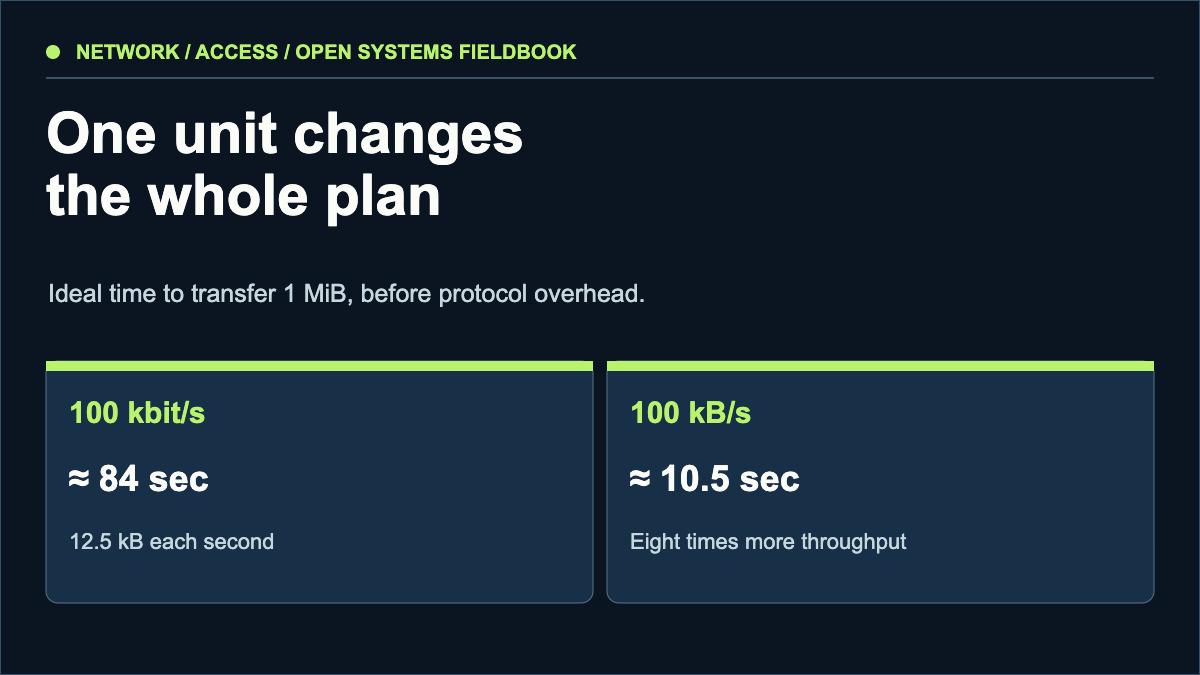
About 12.5 kB/s. A 1 MiB transfer takes roughly 84 seconds before overhead.
About 800 kbit/s. The same transfer takes roughly 10.5 seconds before overhead.
Many tiny requests can feel slower than one larger transfer even when the byte total is unchanged.
Measure the bottleneck you actually have
Record several samples at different times: downstream and upstream throughput, round-trip latency, packet loss, and whether the connection drops. Check one wired device when possible, so a weak Wi-Fi link is not mistaken for a mobile-network problem. Keep the units with every result: bits and bytes differ by a factor of eight.
A speed-test headline cannot tell you how a page behaves under loss or congestion. Compare a small text page, a large download, and a page with many third-party requests. If only the last is painful, reduce requests and script work before chasing raw bandwidth.
Put the first useful answer in the first transfer
For publishers, send meaningful HTML without requiring a client-side bundle to render the article. Compress text, set sensible cache headers for versioned assets, use responsive images, and lazy-load images below the fold. Reserve image dimensions so a late image does not move the text. A site can have a tiny homepage yet still waste a constrained connection through analytics, fonts, autoplay video and repeated API calls.
Choose a page-weight budget from the user's connection, not from a desktop broadband test. At 100 kbit/s, every extra 100 kB can cost around eight seconds in the ideal case. A 50 kB article body is therefore more useful than a decorative megabyte before the first paragraph.
Keep work local and make failure resumable
For readers and operators, prefer offline-capable documentation, a local copy of frequently used references, and resumable downloads where the server supports range requests. Schedule large updates for a reliable connection. Do not depend on an online-only editor for work that must survive a drop.
When a transfer fails, first identify which layer failed: radio, DNS, TLS, server response or application. A second attempt should not duplicate a form submission or destroy a partly downloaded file. Test the recovery path deliberately.
Throttle a browser to an appropriately slow profile and load your own article from a cold cache. Record transferred bytes, request count, time to readable text and the largest blocking resource. Repeat with a warm cache. The difference shows whether caching helps your real visitors.
What the sources contributed
An earlier writer described living with an unstable, very slow cellular connection. This article uses that constraint as a design question. It does not repeat their personal circumstances or claim their measurements as ours.
Sources & scope
These sources support the technical principles above. Commands and compatibility can change; verify the current version before changing a machine.
This is a new, independent edition. Its articles are original editorial work inspired by the domain's technical history; we are not the former author. Meet the author.