The modern web: a practical privacy and resilience checklist
Evaluate browser privacy, ad blocking and site dependencies with a threat model instead of a single perfect-browser claim.
A page can be fast and still collect too much. A browser can block ads and still expose identifying signals. The right starting point is the risk you want to reduce.

Name the threat model
Write down whether your concern is intrusive advertising, cross-site tracking, malware, account compromise or losing access when a script fails. These are different problems. The W3C notes that browser fingerprinting can identify or re-identify a user through observable characteristics, sometimes across sites. Blocking a cookie does not automatically remove every fingerprinting surface.
Reduce unnecessary dependencies
Prefer pages that remain readable without a chain of third-party scripts. Review browser extension permissions; an extension with broad access can become another point of trust. Choose a maintained browser and update it. For a site you operate, minimize third-party requests, document the services that are necessary and test the core content with scripts unavailable.
Test rather than worship a brand
Compare the same journey in two browser configurations: load, readability, sign-in and privacy controls. Do not claim complete anonymity from a toggle or a blocker. A setting that breaks a needed workflow may not be adopted. Record the trade-off and revisit it when browsers, sites or your threat model change.
Specific threat.
Unneeded requests.
Core journey.
Trade-offs.
Try it on a real case
A small publication removes an unnecessary analytics script, keeps its article text server-rendered and tests the page with JavaScript disabled. Readers can still read and navigate; the editors document the one external service they retain.
Limit: Privacy tools reduce exposure; they do not make a user invisible or remove the need for safe account practices.
Sources and verification
This is an independent edition. This page is new work on a question from the domain's technical history; it does not claim to be written by the former author. Read the author profile.
A configuration report another person can reproduce
A useful configuration report separates the environment from the symptom. “It fails on my machine” cannot tell a maintainer whether the parser rejected the input, the input had the wrong shape, or a later action failed. Preserve the smallest input that demonstrates the problem and the command that reads it.
Keep the evidence envelope small
Record the runtime version, operating-system information relevant to the issue, exact command, expected result, actual result and exit status. Copy error text rather than replacing it with a summary. If an input contains private values, make a synthetic replacement and confirm that the replacement still reproduces the same class of failure.
The downloadable example uses only Python's standard library. It reads a JSON document and accepts a top-level object; it does not require a particular field name or value. It performs no network request, configuration change or installation. Its purpose is to make three outcomes distinguishable: accepted input, syntactically invalid JSON and a syntactically valid document with the wrong shape.
Three cases, one command
Our isolated check ran a valid object, a trailing-comma document and an array. The valid object produced an acceptance message and exit status 0. The malformed document produced a parse error and status 2. The array produced a shape error and status 3. These are results of this teaching fixture on the recorded local runtime, not results for every application that reads JSON.
Start with the working case. Change exactly one property to create the failing case. Keep its full contents in the report. A command line without its input, or an error without the runtime version, leaves the next person guessing. If the failure disappears after redaction, report that limit instead of declaring the real problem reproduced.
A minimal report
- State the question: which stage rejects the configuration?
- Attach the synthetic input and exact fixture version.
- Paste the command, runtime version, output and exit status.
- Explain what the fixture does not test: application defaults, file permissions, plugins or deployment.
- Ask the maintainer which additional observation would distinguish the remaining possibilities.
Do not place tokens, account names or production configuration in a public report. Avoid commands that overwrite the actual configuration while preparing an example. The Python JSON documentation describes the parser; the exit statuses here are deliberately chosen for this fixture and should not be attributed to Python or another project's conventions.
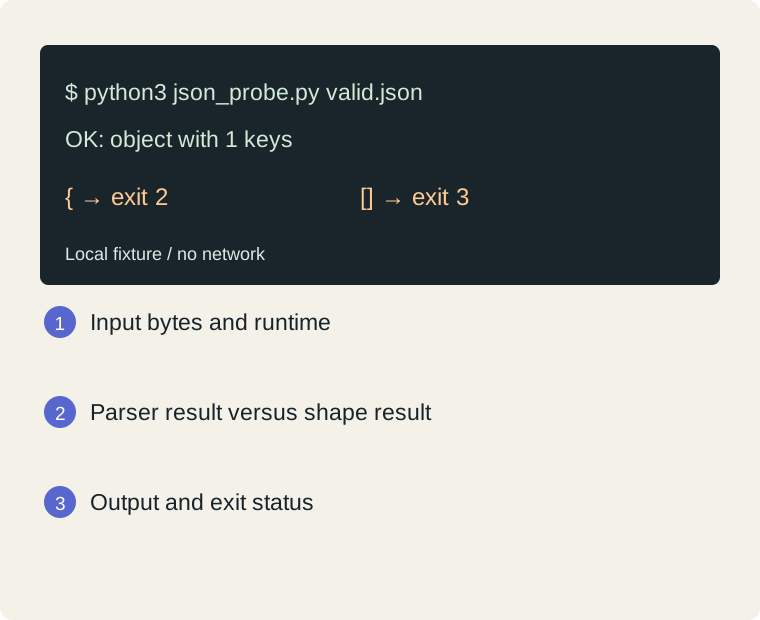
Steps: Input bytes and runtime → Parser result versus shape result → Output and exit status
| Field | Completed example |
|---|---|
| Question | Which stage rejects the document? |
| Runtime version | See json-fixture-results.txt; record your own Python version |
| Exact command | python3 json_probe.py valid.json |
| Synthetic input | {"mode":"read-only"} |
| Expected / observed result | Accepted / exit 0 |
| Untested conditions | No production application or plugins tested |
Blank worksheet and worked example ↓
Download the local Python fixture · Commands and raw results
Primary context: Python 3.12: JSON